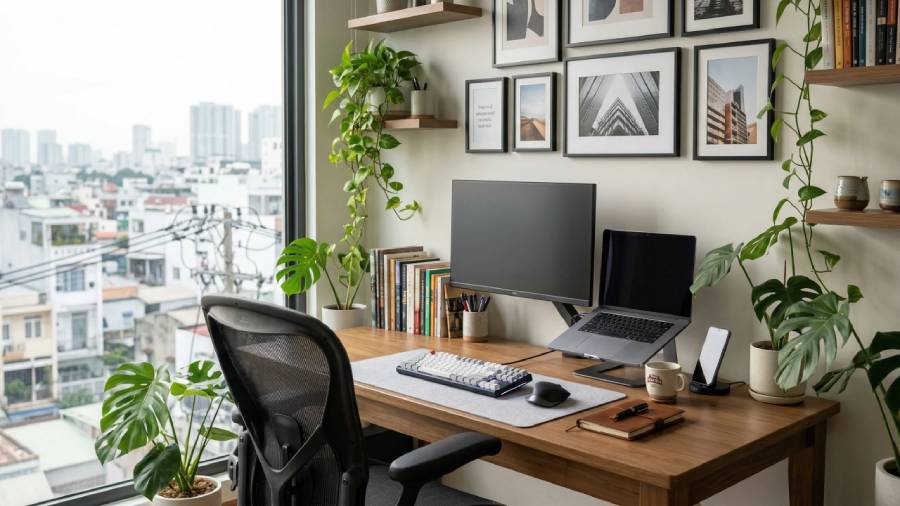
Home Office Setup Ideas for a More Organized Workspace
A well-organized home office can make everyday tasks easier and create a more comfortable environment for working, studying, or managing personal projects. Whether you have a separate office room or just a small corner in your living room, thoughtful planning can help you make better use of the space.
The key to a practical home office is balancing comfort, organization, and style. You do not need expensive furniture or a complete room makeover to create a workspace that suits your needs. A suitable desk, effective storage, good lighting, and a few carefully chosen accessories can make a noticeable difference.
In this guide, we explore home office setup ideas, furniture choices, storage solutions, and simple ways to create a more organized workspace.
1. Choose the Right Desk for Your Space
The desk is often the main feature of a home office, so choosing the right size and design is an important first step.
Before purchasing a desk, consider what you use throughout the day. Someone who works mainly on a laptop may need less surface space than someone who uses multiple monitors, notebooks, and other equipment.
Here are a few options to consider:
-
Compact desk: Suitable for small rooms, apartments, or a dedicated workspace in a bedroom.
-
Writing desk: A simple option for laptop work, reading, and paperwork.
-
Corner desk: Can make use of an otherwise unused corner.
-
Desk with drawers: Provides convenient storage for stationery and documents.
-
Height-adjustable desk: May offer flexibility for alternating between sitting and standing, depending on the model.
Measure your available area before ordering furniture. Remember to leave enough room for your chair, drawers, cables, and comfortable movement.
2. Invest in a Comfortable Office Chair
A suitable chair is an important part of a home office, particularly if you spend several hours working at a desk.
Look for a chair that supports a comfortable working position and fits your body and desk height. Features worth comparing include adjustable seat height, back support, seat depth, armrests, and the materials used.
When arranging your chair and desk, try to keep your feet supported, shoulders relaxed, and elbows comfortably positioned near desk height. Your screen should be placed so you can view it without repeatedly bending your neck.
Comfort varies from person to person, so consider the chair's dimensions and adjustment options rather than choosing a model based on appearance alone.
3. Keep Your Desk Clutter-Free
A crowded desk can make it harder to find everyday items and leave less room for working. Organizing your desk does not mean removing everything; it means keeping useful items accessible and storing the rest appropriately.
Try these simple ideas:
-
Use a pen holder for stationery you regularly need.
-
Keep notebooks and documents in a small file organizer.
-
Use a tray for frequently used accessories.
-
Store spare supplies in drawers or labelled boxes.
-
Remove empty packaging and items you no longer use.
-
Leave a clear section of the desk for your main task.
At the end of each working day, spend a few minutes returning items to their designated places. A short reset can help keep the workspace manageable.
4. Improve Your Home Office Lighting
Good lighting can make your workspace more comfortable to use and help you see documents and screens clearly.
If possible, position your desk near a window to make use of natural daylight. However, pay attention to screen glare and adjust the desk or blinds when necessary.
Consider combining different types of lighting:
Ambient lighting: General room lighting that illuminates the overall workspace.
Task lighting: A desk lamp that directs light towards paperwork or a specific working area.
Adjustable lighting: A lamp with a flexible arm or adjustable brightness can be useful when your tasks change throughout the day.
Choose lighting that suits your room and activities. Avoid positioning bright lights where they reflect directly into your eyes or onto your screen.
5. Organize Cables and Electronic Accessories
Computer cables, chargers, and power adapters can quickly make a workspace look untidy. A simple cable-management system can help keep these items organized and reduce tangling.
Useful options include:
-
Cable clips to guide wires along the desk.
-
Cable sleeves to group compatible cables.
-
Under-desk cable trays for managing excess wire.
-
A designated drawer or organizer for spare chargers.
-
Labels to identify cables when several devices are connected.
Keep power strips in an accessible, well-ventilated location and follow the manufacturer's electrical safety instructions. Do not overload outlets or conceal electrical connections in ways that may cause overheating.
6. Make Better Use of Vertical Storage
When desk and floor space are limited, walls can provide additional storage without requiring another large piece of furniture.
Depending on your needs, consider adding:
-
Wall shelves for books and lightweight supplies.
-
A noticeboard for reminders and schedules.
-
Wall-mounted organizers for small accessories.
-
Document holders for frequently used paperwork.
-
A small shelf for decorative items or plants.
Keep frequently used items within easy reach and avoid overcrowding shelves. Before installing anything, check the wall type and use suitable fixings. Heavy items should be securely mounted according to the manufacturer's instructions.
7. Create a Workspace in a Small Room
Not every home has a separate room available for an office. A small bedroom, living room, or unused corner can still work as a dedicated workspace with the right layout.
Here are some practical ways to organize a smaller area:
Choose compact furniture. A narrow desk or wall-mounted work surface may be suitable where floor space is limited.
Use vertical space. Shelves and wall organizers can reduce the need for additional cabinets.
Choose multifunctional pieces. A desk with built-in storage can help combine two functions in one item.
Keep colours coordinated. Matching the workspace with the surrounding room can make it feel more integrated.
Separate work essentials. Use a basket, drawer, or storage box to keep office supplies together when the workspace also serves another purpose.
Before buying furniture, measure the room carefully and ensure the layout leaves enough space to open doors, move the chair, and walk comfortably.
8. Add Personal Style Without Creating Clutter
Your home office should be practical, but it can also reflect your personal taste. A few thoughtful decorative choices can help the workspace feel more inviting.
Consider adding a framed print, a small plant, a decorative desk accessory, or a desk mat in a colour that complements your furniture.
Neutral shades such as white, beige, grey, and natural wood can create a simple foundation. If you prefer more colour, introduce it through artwork, storage boxes, stationery, or other easily changed accessories.
Try to keep decorative items proportional to the size of the desk. The aim is to personalize the space while leaving enough room for your everyday tasks.
9. Set Up an Efficient Computer Workspace
Your computer setup should support the way you work and the equipment you use.
If you use a laptop for extended periods, consider whether a separate keyboard, mouse, or laptop stand would help you position the screen and input devices more comfortably.
For a desktop computer, check that the monitor is placed at a comfortable viewing distance and height. If you use multiple monitors, arrange them according to how frequently you use each screen.
Keep frequently accessed accessories nearby and store less-used equipment elsewhere. This can help prevent the desk from becoming crowded with items that are not needed for the current task.
Choose accessories that are compatible with your devices and fit your actual working habits.
10. Add Storage for Documents and Supplies
Paperwork and office supplies can take up valuable space if they do not have a designated home.
A practical storage system might include a document tray for items that need attention, a file organizer for paperwork you need to retain, and a drawer or box for spare supplies.
You can also use simple labels to distinguish between categories such as bills, project documents, stationery, and reference materials.
If you keep digital and physical records, create a consistent filing system for both. Store important documents securely and dispose of unnecessary paperwork responsibly.
The best storage solution is one that is easy to maintain, not one that requires an elaborate organization system.
11. Bring Nature into Your Home Office
A little greenery can add colour and visual interest to a workspace. Depending on the room's lighting and your maintenance preferences, you might choose a small indoor plant, a low-maintenance variety, or a decorative artificial plant.
Place plants where they will not interfere with computer equipment, block walkways, or occupy essential desk space.
You can also introduce natural textures through wooden accessories, woven baskets, or neutral fabric organizers. These details can help the office feel connected to the rest of your home decor.
If you share your home with pets or young children, check that your chosen plants and accessories are appropriate for your household.
12. Home Office Setup Ideas on a Budget
Creating an organized workspace does not require replacing every item you already own. Start by identifying the biggest challenges in your current setup and make changes gradually.
Here are some budget-friendly ideas:
-
Repurpose a suitable table as a desk.
-
Use boxes or containers you already have for storage.
-
Rearrange furniture to improve access to natural light.
-
Add an affordable desk lamp where additional task lighting is needed.
-
Use clips or a cable organizer to tidy wires.
-
Declutter before purchasing new storage products.
-
Shop for second-hand furniture if it is in suitable condition.
-
Compare dimensions, materials, and prices before buying office accessories.
Focus on items that solve a real problem in your workspace. This helps avoid spending money on products that look attractive but offer little practical value.
13. Build a Simple Daily Organization Routine
A tidy home office is easier to maintain when organization becomes part of your daily routine.
At the beginning of the day, identify the main tasks you need to complete and keep the relevant materials nearby. Move unrelated items out of the way to create a clear working surface.
At the end of the day, return stationery and accessories to their storage locations, organize any documents that need attention, and prepare your desk for the next session.
Once a week, review your supplies, remove unnecessary items, and check whether your layout still suits your needs.
Small, consistent habits can help prevent clutter from building up again.
Final Thoughts
An organized home office can make everyday work more manageable while complementing the style of your home. The most effective setup is not necessarily the largest or most expensive one; it is the one that fits your available space, equipment, and daily routine.
Start with a suitable desk and chair, improve lighting, organize cables, and give your documents and supplies designated storage spaces. Add personal touches gradually and adjust the arrangement as your needs change.
With thoughtful planning and a few practical improvements, you can create a workspace that feels organized, comfortable, and ready for the tasks ahead.
Affiliate Disclosure: This article may contain affiliate links. If you purchase through qualifying links, this website may earn a commission at no additional cost to you. Affiliate commissions help support the creation of useful home decor, furniture, and workspace guides.